Private by default
Transfers stay on your cable between the Mac and Android device. SmoothDroid does not require uploads, accounts, or a paired phone app.
 SmoothDroid

Android file transfer for Mac
Browse Mac and Android side by side, then copy either direction by dragging or using clear copy buttons. Storage, folder sizes, and transfer history stay visible while you work.
See it work
The 67-second demo shows the complete wired workflow: browse both devices, check space and folder sizes, transfer files, and open a phone file on your Mac.
Buy SmoothDroid for €9 / $10

Built for the real Mac problem
Transfers stay on your cable between the Mac and Android device. SmoothDroid does not require uploads, accounts, or a paired phone app.
Browse your Mac and Android storage side by side, then copy, paste, drag, rename, delete, and create folders from one focused window.
macOS and other transfer tools can grab the same USB interface. SmoothDroid detects common blockers and gives practical recovery actions.
Major features
SmoothDroid stays focused on one job: making Android storage feel practical on a Mac. Browse, open, transfer, and organize files from one clear window.
Move files from Android to Mac or Mac to Android without routing them through a cloud account.
Drag files or whole folders between panes, or use clear copy buttons for either direction.
Double-click folders to explore them or open a phone file in a compatible Mac app using a temporary local copy.
Check selected item counts, folder sizes, and available storage before starting a large transfer.
Create folders, rename items, delete files, and navigate internal storage or an SD card without switching tools.
Follow active files, progress, and errors, with practical guidance when another Mac app blocks MTP access.
How to connect
Open the DMG, drag SmoothDroid into Applications, then launch it on your Mac.
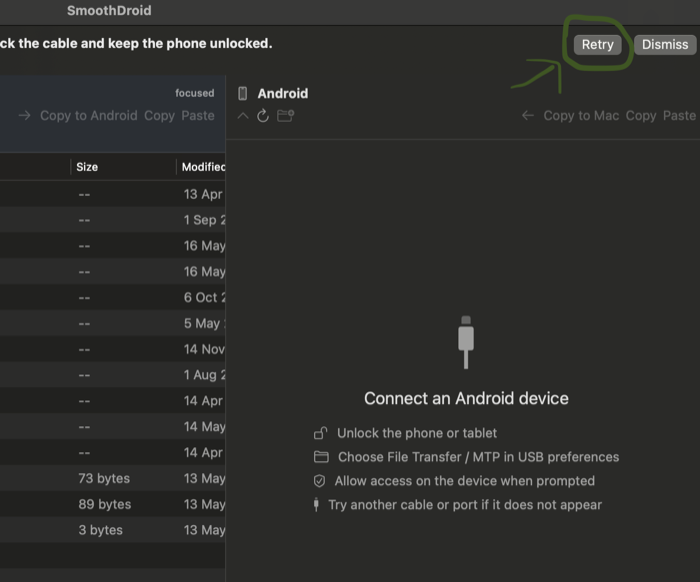
Use a data-capable USB cable, connect directly to the Mac, and keep the phone unlocked.
Tap the Android USB notification and select File Transfer, MTP, or Android Auto.
If SmoothDroid does not connect straight away, reselect File Transfer/MTP, reconnect the cable in a different port, then click Retry Connection.
Compatibility
SmoothDroid is designed for the standard Android USB file-transfer mode used by Samsung Galaxy, Google Pixel, OnePlus, Nothing, Motorola, Sony, Xiaomi, and many Android-based media devices. Real device behavior can still vary, so the refund policy is part of the product.
macOS 12 Monterey or newer, with a universal build for Apple silicon and Intel Macs.
Unlock the phone, connect a data-capable cable, and choose File Transfer, MTP, or Android Auto from the USB notification.
Try the built-in recovery steps, then email your Mac model, macOS version, phone model, and the error shown.
Before checkout
SmoothDroid is a small, paid Mac utility for one job: local Android USB file transfer. You buy once for €9 / $10 and get 1 year of updates. If your phone does not connect after the setup checks, email within 14 days with your device and troubleshooting details for support and review under the connection refund guarantee.
Stripe sends you to the signed and notarized DMG download page for SmoothDroid 1.2.1.
If SmoothDroid cannot connect after the setup checks, keep the device available and send your purchase, Mac, Android, error, and troubleshooting details. Reasonable follow-up checks may be required. See the terms.
Your files stay on the USB cable between your Mac and phone. SmoothDroid does not require cloud uploads or an Android app.
Guides
FAQ
Yes. SmoothDroid Trial includes every feature and limits transfers to files of 5 MB or smaller, so you can verify that your Mac and Android device work before buying the unlimited version.
Yes. Your purchase includes 1 year of free SmoothDroid updates from the purchase date.
No. Transfers happen locally over USB/MTP between your Mac and Android device.
No Android companion app is required. Unlock the phone and choose File Transfer or MTP when connecting by USB.
SmoothDroid supports macOS 12 Monterey or newer, including Apple silicon and Intel Macs.
SmoothDroid is distributed directly because low-level USB/MTP access is a better fit for a signed and notarized direct-download Mac app.
€9 / $10 once. Secure Stripe checkout. Voluntary 14-day connection refund guarantee, subject to the SmoothDroid terms.